The loop: how a Garmin dashboard refreshes itself without a server
The live examples, and the two hops that keep them live.
The clip is my own dashboard, with my own data — the thing the loop was built for. Rebuild Data Now in the ⋯ menu runs the Shortcut; the heart-rate card refreshes while I watch, and the Updated stamp in the header changes. The Running Dashboard in the template is the same loop with made-up data, so you can try it without a Garmin account.
My Garmin dashboard refreshes itself every morning, and no server of mine is involved. Snuggery, the app it lives in, makes no network requests at all — that is a rule of the sandbox, not a setting. So how does a file on the phone come to hold last night's sleep and this morning's readiness?
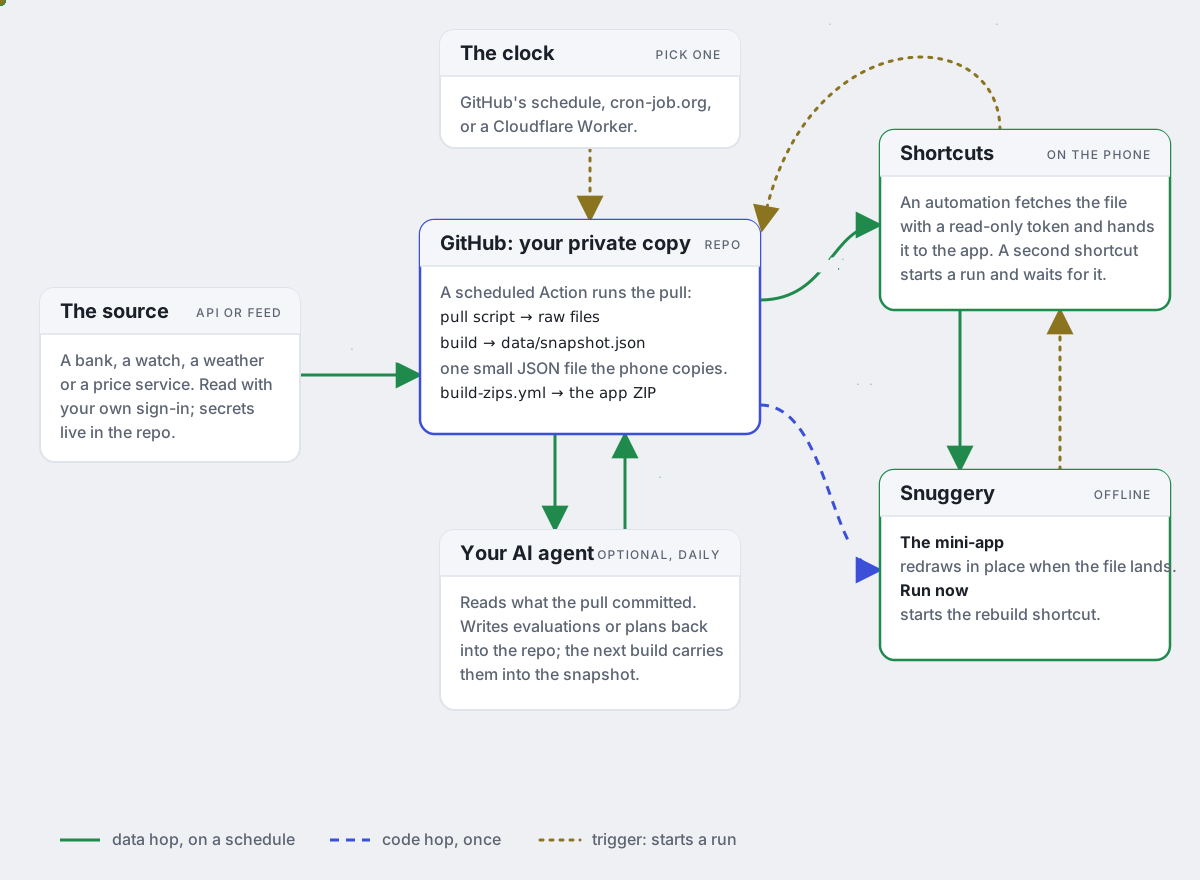
Two hops, deliberately separate
The code hop happens once. The app is a folder of HTML that an AI wrote from a prompt; it arrives as a ZIP and is imported into Snuggery. It reads one file next to it, data/snapshot.json, and draws everything from that. If the app changes, a new ZIP replaces it in place — Snuggery has a control for that — but that is rare.
The data hop happens on a schedule. A GitHub Action runs a script that signs in to Garmin Connect with my own account, fetches what is new, and rebuilds that one JSON file in a repository. Then a Shortcut on the phone does the only thing that has to happen on the phone: it fetches the file and hands it to the app through an action Snuggery provides, Update a File in a Snuggery App. The dashboard redraws in place, same tab, same scroll position. There is also a Rebuild Data Now button in the app's menu that runs the shortcut on demand.
Nothing in this chain is mine to run. GitHub runs the job on its free tier; the phone runs the Shortcut; the app accepts a file. Snuggery never fetches, and the token that lets the Shortcut read a private repository lives in the Shortcut, not in the app.
The version I run: a coach in the loop
The dashboard in the clip is the one I actually use, and its loop has one more part than the template's. Three jobs, deliberately separate, none of them on a machine of mine:
- Data. Every hour, cron-job.org starts a GitHub Action. A script signs in to Garmin Connect with stored tokens, fetches what is new — activities, laps and splits, the per-second streams, training load, sleep, the day's health readouts, weigh-ins, the race calendar — rebuilds the snapshot, pushes it, and leaves a receipt of when it ran and what worked.
- Reasoning. Once a day a scheduled Claude Code session reads what the pull left and writes the coaching text: an assessment of the last four weeks against the four before and the same weeks a year ago, a note on every new session, a nudge on the race forecast, and the week's plan. It reasons on top of Garmin's labels rather than restating them, says what the data cannot support, and on a quiet day changes only what today's readouts touch. It never calls Garmin while the data is fresh.
- Delivery. The Shortcut copies the snapshot into the app every morning, or when I press Rebuild Data Now. Snuggery draws the Now, Plan, Training, Health and Sessions panes from that one file, offline.
Data and reasoning were one job until 11 September; splitting them made the pull cheap and hourly and the agent's run small and daily. The agent's procedure is a document in the repository rather than a line in a schedule, so it can be corrected without touching the schedule, and a person can run it by hand if the schedule stops.
What is in the template
The open template repository holds the whole loop for ten live apps: the workflow that fetches, the script that builds the snapshot, and — for the two that need credentials — a demo with made-up data so the app draws something before you connect anything. Seven of them — a clock, world headlines, tomorrow's electricity prices, global wind and weather, every US earthquake with the USGS feed, and NASA's temperature record — need no key and no account at all; they refresh from open sources from the moment you install them. The Running Dashboard needs a Garmin sign-in and a copy of the template of your own, and its PROMPT.md walks an AI session through setting that up, including the one thing it must never do: put the sign-in tokens anywhere but the repository's secrets.
Snuggery's own screen for this is called Keep This Up To Date. It explains the loop, offers the ready-made shortcut to add with one tap, and shows the row to fill in for each app. The Create tab's prompt teaches the same shape to whatever AI writes your next app, so a new dashboard is one more row in the shortcut, not a new setup.
Two things learned the hard way
First: GitHub's scheduled workflows on a personal account are not a clock. Over twenty-four measured hours, the schedule fired 5 of 24 hourly slots, in batches, with gaps of two to five hours; an external cron service dispatching the same workflow hit 22 of 22 slots, each within a minute. The template's scheduler folder has the recipe, and the app's guidance presents the options — GitHub's schedule, an external trigger, an agent session, the phone — with their trade-offs, so you can pick the one that fits your setup rather than the one I picked.
Second: a shared Shortcut publishes its headers. A token pasted into a shortcut that is then shared is shared with it. And a private repository answers a bad token with 404, not 401, with a body that is valid JSON — which the intent would happily write over good data. Both warnings now sit in the guidance at the exact point where it first asks for a token.
The raw store never ships. A copy of the Running Dashboard that has pulled real data holds a per-second GPS trace of every run, most of which start at someone's front door. That store lives in the app's folder in the repository and is left out of every ZIP the template builds, and a commit that touches only it rebuilds nothing.
The demo's data is generated: nine months of running with a half-marathon block in progress, its streamed runs cut from six famous marathon courses (OpenStreetMap-derived, ODbL) on public-domain USGS tiles, and a coaching write-up composed for that runner. The template README says so, because on screen it is built to look like a real copy.
Open the dashboard in your browser · Get the ZIP for an iPhone with Snuggery · All the examples